Deep Links
Deep links enable your application to open specific screens or content directly from notifications, web pages, or external sources. By integrating deep links, you can guide users to precise destinations within your app — enhancing engagement and creating seamless navigation between notifications, campaigns, and in-app experiences.
Overview
Handling deep links in your Flutter application allows you to:
- Support Deep Link notification types from Actito.
- Handle custom URL schemes or HTTPS links from web pages.
Once configured, your app can interpret incoming URLs and display the appropriate screen or content dynamically.
Declaring a custom URL scheme
- Android
- iOS
To enable your app to handle a custom URL scheme, declare an activity and its corresponding intent filter in your AndroidManifest.xml. Be sure to update the android:scheme attribute to match your own application’s scheme.
<activity android:name=".MainActivity">
    <intent-filter>
        <action android:name="android.intent.action.VIEW" />
        <category android:name="android.intent.category.DEFAULT" />
        <category android:name="android.intent.category.BROWSABLE" />
        <data android:scheme="com.example" />
    </intent-filter>
</activity>
To enable your app to handle a custom URL scheme, declare your custom URL scheme in your Info.plist. Be sure to update the scheme to match yours.
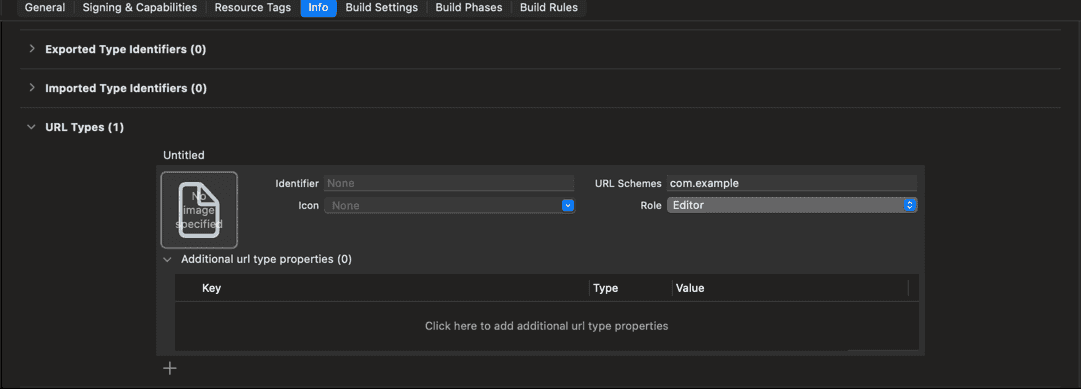
With this configuration, links such as com.example://example.com/product?id=1 will automatically open your application.
Handling deep links intents
When a user opens a deep link — either from a notification or a web page — your application will be executed and the Actito.onUrlOpened event will be called:
Actito.onUrlOpened.listen((url) {
  // process the deep link
});
This implementation ensures that standard deep links are properly handled.
Supporting external deep links (Android 11+)
If your app needs to open external deep links (for example, to open URLs in the browser), Android 11 and higher requires you to declare supported schemes explicitly in your manifest:
<queries>
    <intent>
        <action android:name="android.intent.action.VIEW" />
        <category android:name="android.intent.category.BROWSABLE" />
        <data android:scheme="https" />
    </intent>
</queries>
This allows your application to safely query and launch external URLs.
Handling notification links
Deep links are also used within HTML and Web Page notification types. To handle links clicked inside these notifications, declare the supported URL schemes in your manifest and define them in a resource file.
This functionality is available only when notifications are presented using the actito-push-ui module. If you handle notification presentation manually, you are responsible for processing clicked URLs within your own implementation.
- Android
- iOS
Add Metadata in the Manifest
<meta-data
  android:name="com.actito.push.ui.notification_url_schemes"
  android:resource="@array/notification_url_schemes" />
Define the Schemes
Create a resource file named notification_url_schemes.xml in res/values/ and add the supported URL schemes to it.
<?xml version="1.0" encoding="utf-8"?>
<resources>
  <string-array name="notification_url_schemes">
    <item>com.example</item>
    <item>com.example2</item>
    <item>com.example3</item>
  </string-array>
</resources>
Add URL schemes in the ActitoOptions.plist
<plist version="1.0">
  <dict>
    <key>URL_SCHEMES</key>
    <array>
      <string>com.example</string>
      <string>com.example2</string>
      <string>com.example3</string>
    </array>
  </dict>
</plist>
This configuration allows the SDK to intercept links matching any of the defined schemes and trigger a callback when clicked.
Any click in an HTML or Web Page notification type, would be intercepted by our library and trigger the event ActitoPushUI.onNotificationUrlClicked.
ActitoPushUI.onNotificationUrlClicked.listen((data) {
  logger.i('About to present notification: $data');
});